Skip to content
Tulga Labs

portiye:3000 · node · ~/dev/shop

Find what's using a port, and stop it

A menu-bar app that shows every listening port, the process and project behind it, and kills it in one click.

  • macOS · Windows · Linux
  • Free · MIT license
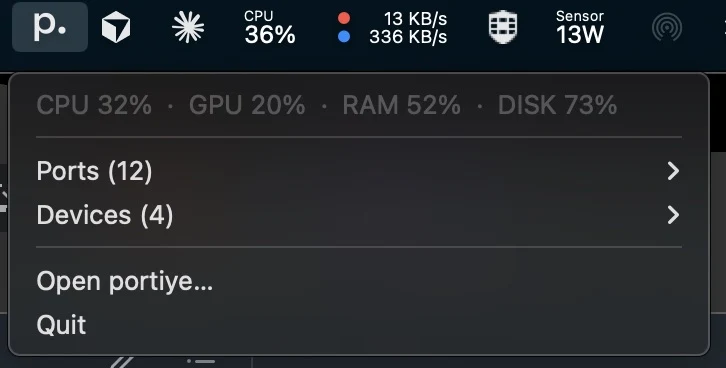
The portiye menu bar menu: a one-line CPU, GPU, RAM and disk readout above the ports and devices submenus
The window is optional: ports and devices are reachable, and killable, from the menu bar.

Why it exists

Fix “EADDRINUSE: address already in use” without the detective work

$ npm run devError: listen EADDRINUSE: address already in use :::3000$ lsof -i :3000

You run npm run dev and get Error: listen EADDRINUSE: address already in use :::3000. Something is on port 3000. You do not know what, and you have four terminals open.

The usual path is lsof -i :3000, squint at a PID, kill -9 it, then discover the real server was a child of the thing you killed and is still holding the port.

portiye collapses that into: open the menu bar, read the row that says :3000 · node · ~/dev/shop, click Kill. Its children go with it.

Features

Every port, the process behind it, and everything it spawned

:3000

What is running on port 3000? Every listening port, and who owns it

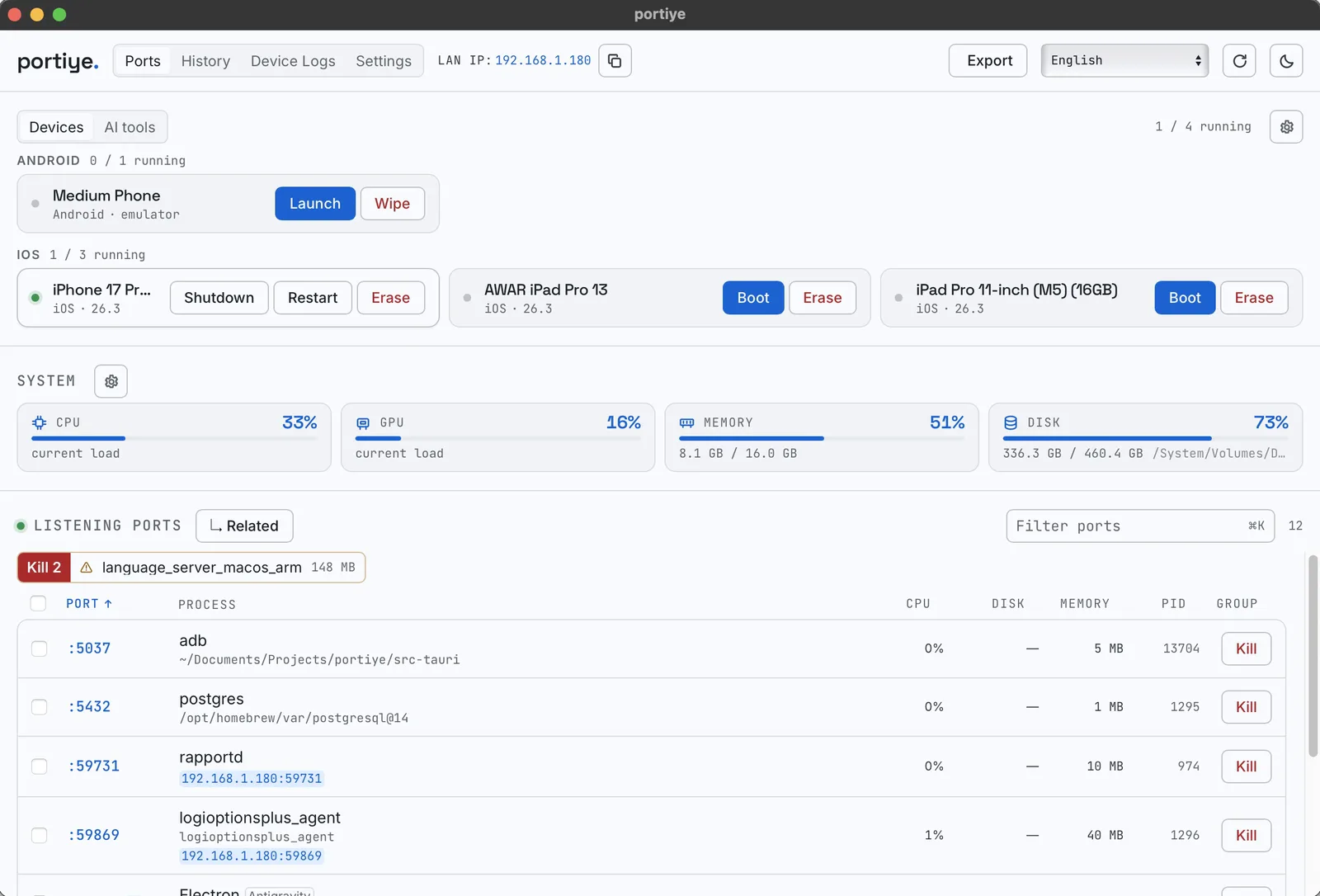
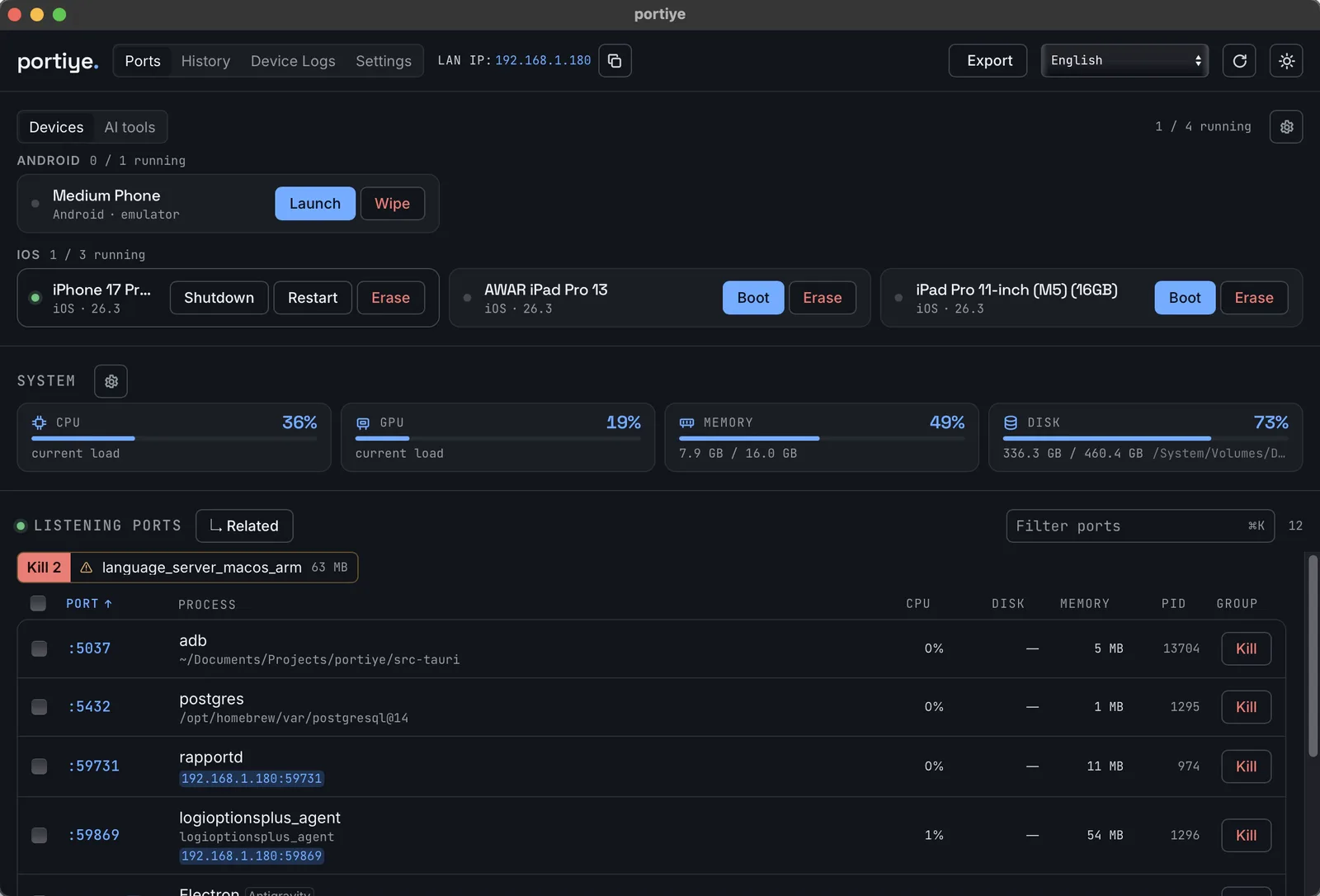
Ports are grouped by process family: emulator and the qemu it spawned are one row, and killing the row takes the whole tree down, so no orphan is left holding the port. Each row names its owner: the .app bundle, the AVD, or the project directory the process started from. ~/dev/shop beats a bare node.

The portiye Ports tab in light mode: devices strip, system gauges and every listening port with the process and project behind itThe portiye Ports tab in dark mode: each port named by its owner, such as the project an adb was started in or postgres's data directory

:5173

Kill the process using a port on macOS, Windows and Linux

Click Kill on the row and portiye also kills whatever that process spawned, which is the part kill -9 gets wrong. Fast Kill clears every stray node, python, JVM, .NET, Go, Ruby, PHP, Rust or Dart process in one click, with a confirmation that names each one.

A Node project shows up as node, vite, esbuild, next-server and nodemon at once. The Node.js chip sweeps them all.

When the OS refuses, portiye retries under sudo, UAC or polkit and says which prompt is about to appear.
:5432

Guardrails before anything dies

Databases (postgres, mysqld, mongod, redis), editors and IDEs, OS services and container hosts each carry an explicit warning into the confirmation. Nothing is ever killed silently.

:8080

Port history, even with the window closed

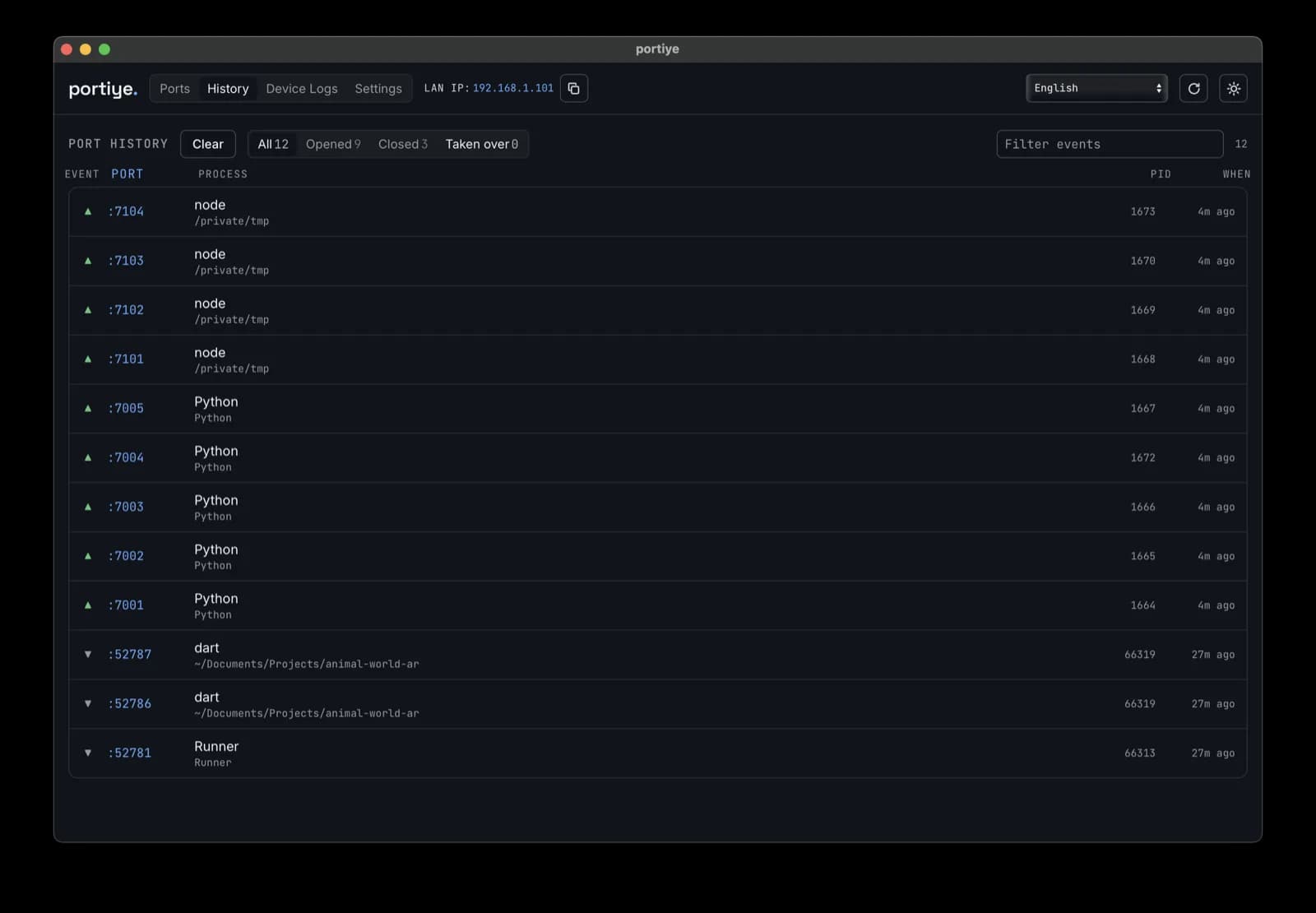
What opened, what closed, and when a different process took a port over, recorded in the background and filterable by event.

The portiye History tab: ports opening and closing over time, filterable by event

:5037

Emulators, simulators, containers and daemons

Android emulators, iOS simulators, Docker containers, Ollama models and JVM build daemons: start, stop, restart and wipe. Restart keeps the data; Wipe says so before you agree.

Live device logs from simctl log stream and adb logcat, filtered, copyable and exportable.

:11434

Names the AI tools behind the ports

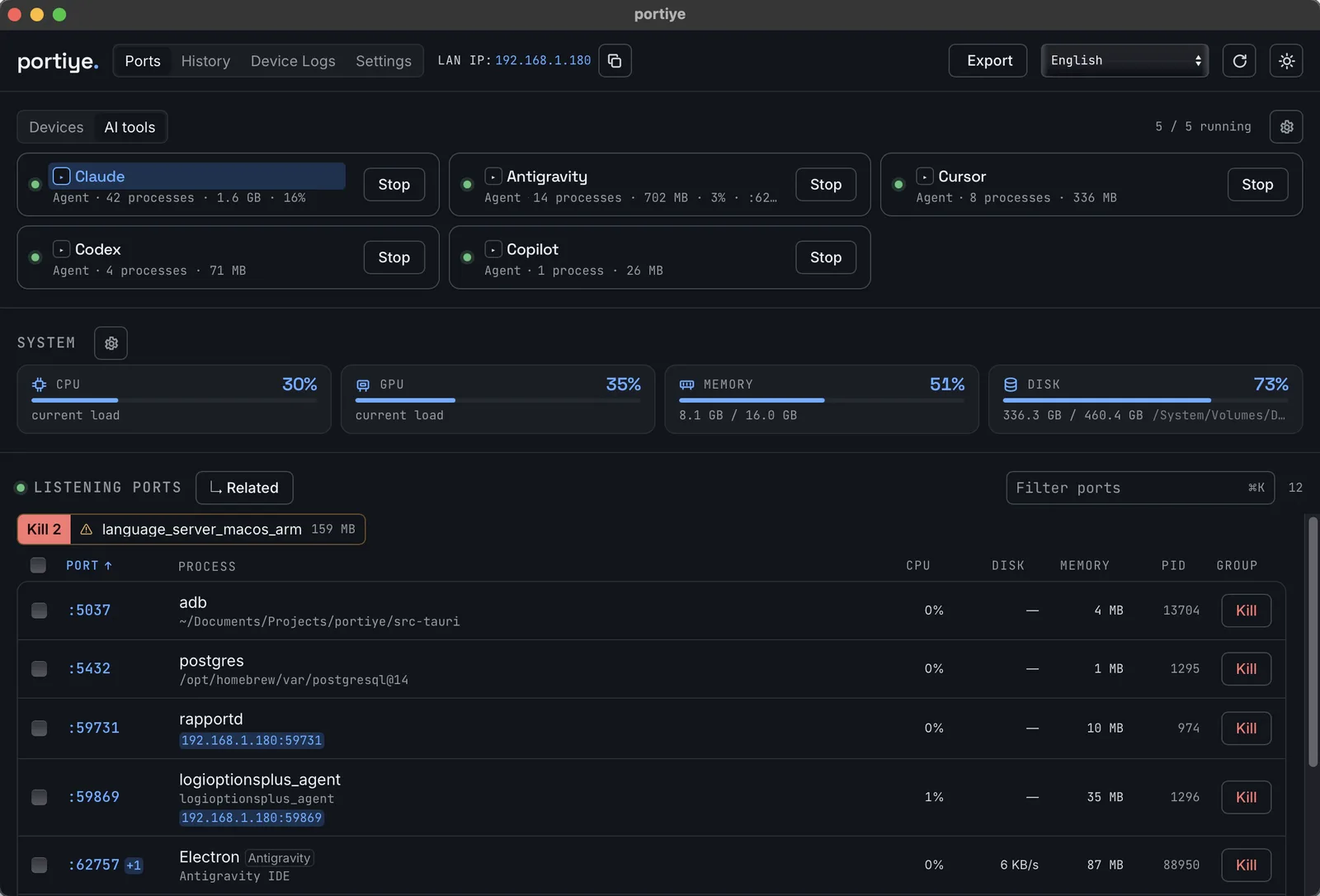
Ollama, llama.cpp, LM Studio, vLLM, ComfyUI, Stable Diffusion WebUI, MCP servers, Claude, Codex, Antigravity, Cursor and Copilot are named from argv, the project directory or a port the tool always binds. Never by reading a process's memory, and never a guess.

  • An AI tools panel lists the agents that hold no port at all, with process count, memory and a Stop button.
  • The .gguf, .safetensors and .onnx weights a process holds open appear in its detail panel: what explains an 18 GB python.
The portiye AI tools tab: Claude, Antigravity, Cursor, Codex and Copilot, each with process count, memory and a Stop button

:off

Everything can be switched off

A gauge that is off is never measured: GPU off means no probe and no nvidia-smi sampler; devices off means simctl, adb and docker never run.

  • Export a JSON or CSV snapshot of what is listening
  • Start at login, toggled from the toolbar
  • 28 languages, with the layout mirrored for right-to-left
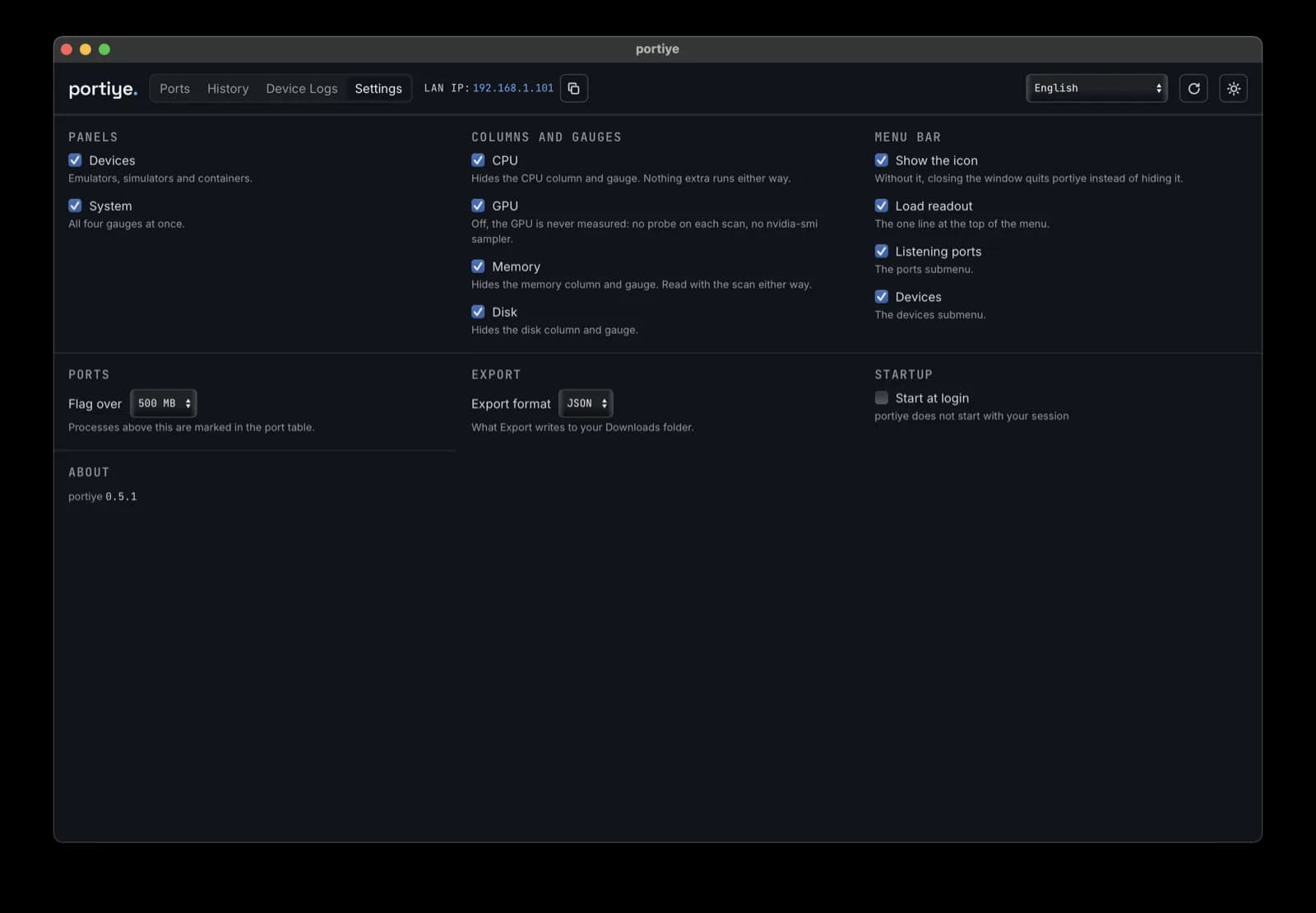
The portiye Settings tab: switches for every panel, column, gauge and menu bar element

Privacy

It reads your machine, and that is all

No telemetry, no account, no network calls.

  • No update ping and no analytics. It reads local process and socket state.
  • It writes only when you export a file.
  • AI tools are identified from argv, project directories and known ports, never by reading process memory.
  • A disabled panel or gauge is never measured at all.

Install

Install portiye

Download the installer for your platform from the latest GitHub release.

  1. Download the .dmg. macOS 10.13 or later, Apple silicon and Intel.

First launch

  1. macOS 15 (Sequoia) and later: open it once, then go to System Settings → Privacy & Security and click Open Anyway.

  2. macOS 14 and earlier: right-click the app and choose Open.

  3. Either way, this also works:

    xattr -dr com.apple.quarantine /Applications/portiye.app

Tech stack

A native WebView rather than a bundled Chromium, so the whole app is a few tens of megabytes rather than a few hundred.

Desktop runtime
Tauri 2 with the native WebView
Backend
Rust: one poller scans every five seconds and feeds the window, tray and history
Ports
lsof on macOS and Linux, netstat on Windows, joined with sysinfo
UI
React 19, TypeScript

Comparison

How it compares to lsof, netstat and Activity Monitor

portiyelsof / netstatActivity Monitor / Task Manager
Shows listening portsYesYesWindows: partly; macOS: no
Says which project a process belongs toYesNoNo
Kills child processes tooYesNoNo
Warns before killing a database or your editorYesNoNo
Groups a process tree into one rowYesNoPartly
Records port takeovers over timeYesNoNo
Manages emulators and containersYesNoNo
Works without a terminalYesNoYes
Cross-platform, one interfaceYesDifferent flags per OSNo

portiye does not replace lsof for scripting. It replaces the twelve seconds of squinting between “something is on the port” and “it is gone”.

FAQ

portiye FAQ

Is portiye free?

Yes. MIT licensed, no paid tier, no account.

Does it send anything over the network?

No. There is no telemetry, no update ping, no analytics. It reads local process and socket state and writes only when you export a file.

Which operating systems does it support?

macOS, Linux and Windows, from one codebase. macOS is the daily driver; Linux and Windows are compiled and tested in CI.

Do I need sudo or admin rights?

Not for your own processes. When the OS refuses, for a process owned by another user, portiye offers to retry with elevation and tells you which prompt is about to appear.

Is it safe to kill a process from here?

For dev servers, yes: that is what it is for. Databases, editors, OS services and container hosts carry an explicit warning into the confirmation, and every destructive action lists exactly what it will affect before you agree. Nothing happens without a click.

Why did it kill more processes than I selected?

Because the one you selected spawned them. An npm run dev supervises the real server; killing the supervisor alone leaves the port occupied. The confirmation says “Processes they started are killed too.”

What is a “family” in the port list?

A process and its listening descendants, collapsed into one row: emulator plus the qemu it spawned, or adb plus its server. Sorting by Group orders by how many processes belong together.

Does it work with Docker, WSL or Podman?

Docker containers appear with start, stop and remove, and ports a container publishes appear in the port list like any other listener. Podman and Colima are recognised as container hosts for kill warnings. With WSL, ports forwarded to Windows appear; processes inside the VM are managed inside it.

How is this different from the kill-port npm package?

kill-port frees a port you already know about, from a script. portiye is for the moment you do not know what is on the port, do not know what killing it will take down, and would rather see it than guess.

Does it run in the background?

It lives in the menu bar or system tray. Closing the window keeps it running and the scanner keeps recording history. Quit from the tray menu to stop it.

How much does it cost to run?

One scan every five seconds, shared by the window, the tray and the history. Device enumeration (simctl list, docker ps) runs on a slower 30-second timer because those shell out and cost real time.

Free, open source, yours to read.

Issues, translations and small focused pull requests are welcome. Translation fixes are the easiest contribution to make. MIT licensed. Contributions, translations and bug reports are welcome.